St. Louis Post-Dispatch News
- 4.5
- Rating
- 100.00K
- Installs
- Free
- Price

 Analysis by App-foxy
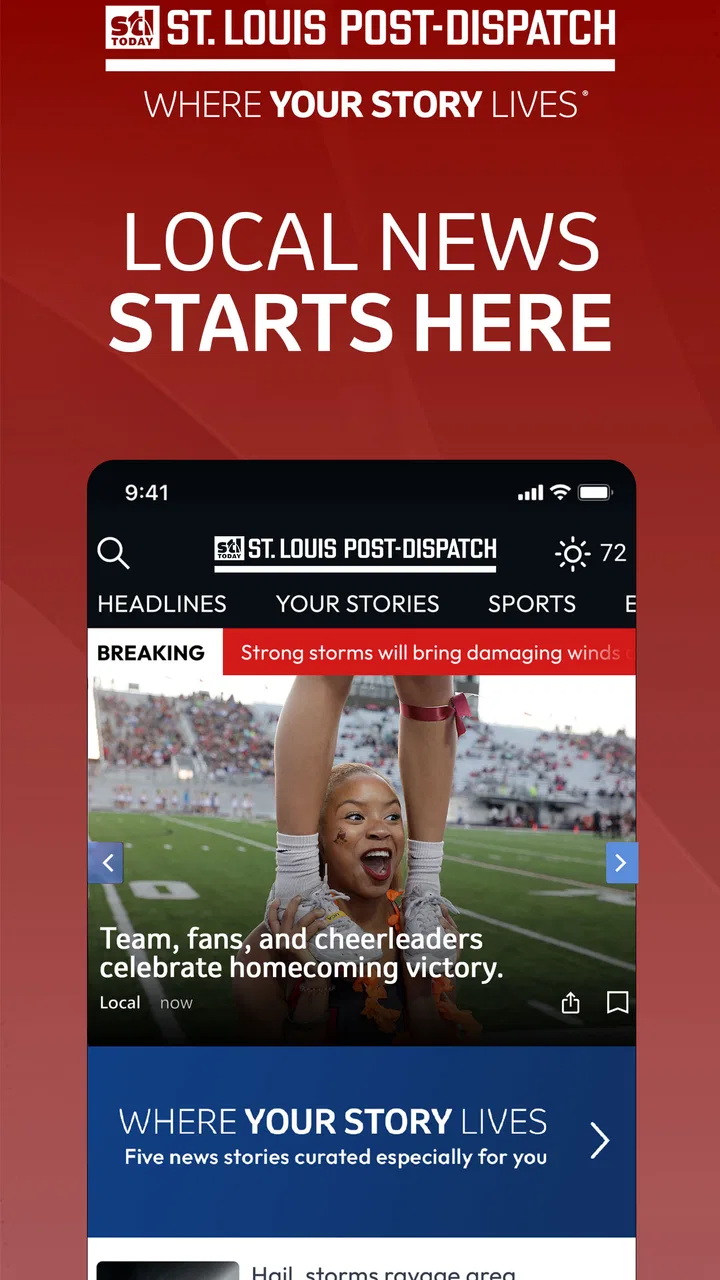
I spent time with St. Louis Post-Dispatch News as a daily news reader, paying particular attention to how comfortably it works for different reading habits, abilities, and situations. It is a free News & Magazines app from St. Louis Post-Dispatch, aimed at people who want local reporting, sports, entertainment, video, and related coverage in one place. My overall impression is that it works best as a focused companion to the newspaper’s wider coverage rather than as a complete replacement for every source of news.
The app has been available since December 9, 2010, and its current version is 9.22. It supports Android 8.0 and later, carries an Everyone age rating, and has passed the point of being a niche download: it has more than one hundred thousand installs and an average rating of 4.5 from roughly one thousand four hundred ratings. Those figures suggest a mature, established local-news product, although popularity alone does not tell you whether its reading experience suits your eyesight, attention span, device, or daily routine.
How the app supports different readers and situations
I find the app most useful when readers adapt their routine to the kind of coverage they want, rather than trying to follow every headline at once. A quick local check, a focused sports read, or a longer evening article can each suit a different moment; the next question is how to make those visits comfortable and purposeful.
You May Also Like

 Blood Strike: 2.5 Anniversary
Blood Strike’s Loadouts Turn Every Drop Into a Tactical Gamble
A close look at Blood Strike’s custom loadouts: how fast access to signature weapons reshapes its battle royale rhythm, rewards preparation, and narrows the gap between fights.

 Pandora - Music & Podcasts
Pandora’s Music Is Easy to Start, but Harder to Recover
Pandora’s strength is its low-effort path from a seed to a station. Its weak spot is how much confidence it asks you to place in connection, setup, and quiet recovery.

 8 Ball Pool
 Is Built on Rivalries, Rematches, and Routine
A close look at the rivalries, rematches, shared routines, and unanswered safety questions that turn a quick pool match into a persistent mobile community.

 Samsung Music
’s Quiet Strength Is Playing What You Already Own
Its reach comes less from spectacle than from dependable access to a personal library. That simplicity is both the app’s strongest retention engine and its ceiling.

 AccuWeather: Weather Radar
AccuWeather Review: A Quick, Clear Forecast for Everyday Decisions
For everyday plans, the best forecast is the one you can understand quickly. AccuWeather makes rain timing, radar, and local conditions easy to act on, with a few trade-offs.

 Hill Climb Racing
Why Hill Climb Racing Still Turns Crashes Into One More Run
A tiny car, a bumpy hill and one more upgrade: Hill Climb Racing keeps resurfacing because its simple chaos makes every near-miss feel personal.
More From Our News Desk



Readability and navigation in everyday use
The strongest reason to use this app is focus. Instead of opening a broad national news service and sorting through an endless mixture of subjects, I can turn to a source centered on St. Louis. That narrower editorial purpose makes the app useful when I want to understand what is happening locally without first searching through unrelated headlines. Local news, sports, entertainment, and video sit within the same general destination, so the app can serve different interests without requiring several separate publications.
I found that this kind of organization matters for readers who tire quickly from information overload. A person checking the app before work can look for the most relevant local developments, while someone following a team or local entertainment story can return for a different section later. The advantage is not simply having many topics; it is having a recognizable local frame that helps reduce the effort of deciding where to begin.
At the same time, a news app is only as accessible as its individual screens and article presentation. Text-heavy pages can be demanding for people with low vision, dyslexia, concentration difficulties, or fatigue. I would approach the app with the same practical test I use for any reading service: open several articles, check whether the text remains comfortable on your phone, and see whether the controls are easy to identify without rushing. System-level display enlargement and contrast settings may improve the experience, but the result can vary by device and operating-system configuration.
One useful habit is to treat the home screen as a starting point rather than a place to read everything. I would scan the available subjects, choose one story, and finish or abandon it before jumping repeatedly between headlines. That simple workflow reduces visual clutter and makes the app more manageable for readers who find rapid switching tiring. It also helps avoid confusing a short video item, a headline, and a full article when moving quickly through the feed.
The app’s local emphasis is especially helpful for people who want context close to home. National aggregators often give local stories less prominence, while social feeds mix reporting with commentary, reposts, and distractions. Here, the publication identity is clearer. That does not mean every reader will prefer the layout or article flow, but it does mean the app has a defined purpose instead of trying to be an all-purpose internet portal.
Motor and sensory considerations
For users with limited dexterity, the main question is how much precision the app demands during ordinary browsing. News reading involves repeated taps, scrolling, selecting headlines, and sometimes starting video. I would recommend using the app with the phone held in the position that gives you the most stable grip, especially if you are reading while standing or commuting. A larger device may make articles easier to see, but it can also be harder to hold for long periods.
Readers who experience motion sensitivity or sensory fatigue may prefer the written parts of the service over video. Video can be valuable when seeing an event or hearing a report is more effective than reading, but it can also introduce movement, changing sound, and extra stimulation. I would keep the phone’s media volume low in shared spaces and avoid relying on video when I need a quiet, predictable reading session. The app’s combination of articles and video is a strength for variety, but it means the experience is not limited to calm, static text.
Audio is another practical consideration. I would not assume that every item offers an equivalent listening experience, so users who depend on spoken content should test the specific stories they care about. Likewise, anyone who needs captions or transcripts for video should check the individual presentation rather than treating all media as interchangeable. These are not reasons to dismiss the app; they are reasons to decide whether its particular mix of formats matches your needs.
For readers with attention-related difficulties, local relevance can work in the app’s favor. A smaller geographic focus gives me a clearer reason to open a story. I can ask, “Does this affect my city, neighborhood, commute, team, or cultural plans?” That question is more useful than endlessly scanning a general feed. On the other hand, breaking news can still be emotionally intense, and a stream of urgent headlines may be tiring. Taking a deliberate approach—checking at chosen times rather than leaving the app open constantly—can make the service easier to live with.
People who rely on assistive technologies should evaluate the app alongside their device’s normal accessibility tools. Screen magnification, larger text, voice control, and color adjustments may help, but I would pay attention to whether enlarged text causes more scrolling or whether controls remain easy to reach. A reader who uses one-handed operation may find a long article comfortable once opened but less comfortable during frequent navigation. In my view, the app is worth testing rather than assuming it will either solve or create every accessibility challenge.
Situational access: commuting, home, and low-attention moments
A realistic use case is a short morning check before leaving home. I can open the app, look for local developments, and decide whether anything deserves a deeper read later. This is more practical than trying to consume an entire news cycle at once. If I am already carrying a bag, preparing breakfast, or dealing with limited time, the app’s value comes from helping me identify what matters, not from demanding a long uninterrupted session.
It also suits a quiet evening routine. I might read a local report, switch to sports, and then check entertainment coverage without changing services. That variety gives the app a useful place in a household where different people follow different parts of St. Louis life. One person may care about civic news, another about sports, and another about events or video. The shared local focus is the common thread.
For commuters, I would be cautious about reading while walking, cycling, or driving. News apps are designed for attention, and even a quick headline can become a distraction in an unsafe setting. On public transport, the app can be convenient, but crowded conditions create their own problems: small text, glare, unstable hand position, and limited privacy. A larger text setting can help readability, while headphones may create a better video experience, but neither solves the need to stay aware of your surroundings.
People with inconsistent internet access should also plan their use around the moment they have a reliable connection. I would open the app before leaving a strong Wi-Fi area and avoid assuming that every article or video will remain equally convenient in a weak-signal environment. Since video can consume attention and connectivity more quickly than a short text item, I would prioritize written stories when time or signal is limited. This is a practical distinction that is easy to miss when judging the app only from its list of subjects.
The app can be helpful for older readers who want local information without navigating a general social platform, but the phone itself remains important. A small screen, bright reflections, or a crowded notification area can make any news service uncomfortable. I would pair the app with the clearest display settings available and read in a place with even lighting. These adjustments are not special app features, yet they often determine whether a local news tool becomes a daily habit or gets abandoned.
Where the experience still creates friction
The first limitation is scope. This is a St. Louis-centered publication app, so someone looking for broad international coverage, a highly customizable national briefing, or a single dashboard combining many publishers may prefer an aggregator. I like the local concentration, but I would not install it expecting the same breadth as a general news platform. Its usefulness depends on caring about the region and wanting the publication’s editorial focus.
The second limitation is that a publication app can feel less flexible than a browser-based collection of sources. A browser makes it easy to compare several outlets, search widely, or move between different perspectives. This app offers a more direct route into St. Louis Post-Dispatch coverage, which is convenient when that is exactly what I want, but less convenient when I am researching a subject across multiple publications.
Cost may also influence the decision. The app itself is free to install, while in-app purchases are listed from about twenty-seven dollars to around three hundred twenty-five dollars per item. That is a significant range, so I would examine any purchase screen carefully before confirming anything and decide whether the free access meets my needs. A person who only wants occasional headlines may have a different calculation from someone who expects sustained access to a publication’s full offering.
Another point of friction is the difference between reading an article and navigating around it. The content may be relevant, but users with motor limitations or reduced attention may find repeated scrolling and small touch targets more tiring than expected. I would test the app during a normal day, not only in ideal conditions. Try it when the phone is held in one hand, when the display is enlarged, and when you have only a few minutes. Those tests reveal more than a quick first impression.
There is also a trade-off between immediacy and calm. A local news service is valuable when something important is happening nearby, but frequent checking can turn into a stressful habit. I prefer opening it with a purpose—local updates, sports, entertainment, or a specific story—rather than treating every headline as an obligation. Readers who are sensitive to alarming news may benefit from setting personal boundaries around when and how often they use it.
Who will benefit most, and who should choose another option?
I would recommend this app to St. Louis residents, former residents who want a connection to local developments, and readers who prefer a publication-led experience over a constantly changing social feed. It is also a sensible choice for households where local news, sports, entertainment, and video need to coexist in one recognizable service. The developer’s long-running presence in this category gives the app a clear identity, and the strong average rating indicates that many users find that identity worthwhile.
I would be more cautious about recommending it to someone who wants only national headlines, fully personalized coverage from many outlets, or a reading experience built entirely around audio. It may also be a poor fit for a person whose phone cannot comfortably display article text or whose accessibility needs require features that must be verified directly during testing. In those cases, a browser with a preferred screen-reader workflow, a dedicated audio-news service, or a more customizable aggregator may be better.
For families, the Everyone age rating makes the app broadly suitable from an age-classification perspective, but that does not mean every news item will feel appropriate for every child or sensitive reader. News can include upsetting subjects, so I would still guide younger users and consider whether independent browsing is suitable. The rating is reassuring for general access, not a substitute for judgment about individual stories.
My inclusive verdict after regular testing
What I appreciate most is the app’s clear local purpose. It gives St. Louis news a dedicated place on the phone and adds sports, entertainment, and video without forcing me to begin in a giant national feed. For many readers, that focus can reduce searching and make a short daily check more meaningful. The free entry point also makes it easy to try the experience before deciding whether the available content and purchase options fit a longer-term routine.
My advice is to judge it through your own reading conditions. Increase text size if needed, test navigation with one hand, try both articles and video, and see how it behaves when you have only a few minutes or a weak connection. If the text remains comfortable and the local focus matches your interests, this is a useful addition to a St. Louis reader’s phone. If you need a broad multi-source briefing, a strongly audio-first format, or highly specialized accessibility behavior, another news option may serve you better.
In the end, I see St. Louis Post-Dispatch News as a practical local-news tool with a recognizable editorial home and a good range of subjects. Its inclusive value comes less from promising a universal solution and more from letting different readers approach the same local coverage through text, video, short visits, or deeper reading. The best reason to choose it is simple: you want St. Louis coverage to be easier to find and easier to make part of your own routine.
FAQs for St. Louis Post-Dispatch News
01What is the St. Louis Post-Dispatch News app?
The St. Louis Post-Dispatch News app is a mobile news platform for following local, regional, national, and international stories. It typically includes breaking news, politics, sports, business, entertainment, opinion, and community coverage, with articles presented in a format designed for reading on Android and iOS devices. Availability of sections and features may vary by subscription and location.
02Is the St. Louis Post-Dispatch News app free to download and use?
The app can generally be downloaded without an upfront charge, but access to all content may require a paid subscription. Some articles or features may be available for free, while premium stories can be limited by a digital paywall. Before subscribing, users should review the current pricing, trial terms, renewal conditions, and any differences between app-store and website subscriptions.
03What features does the St. Louis Post-Dispatch News app offer?
Depending on the current version, the app may provide breaking-news alerts, personalized reading options, saved articles, photo galleries, videos, sports coverage, and access to the newspaper’s digital edition. Push notifications can help users follow important developments quickly, although they may be adjusted or disabled in device settings. Features can differ between Android and iOS releases.
04Does the app require an account or subscription?
An account may not be necessary to download the application or read every publicly available story, but registration is commonly required for managing a subscription, synchronizing access across devices, saving preferences, or viewing premium content. If you already subscribe through the newspaper’s website, check whether your existing login works in the app and whether an app-store purchase creates a separate billing arrangement.
05Can I read St. Louis Post-Dispatch News offline?
Offline reading depends on the features included in the current app version and the type of content being accessed. Some digital-edition or saved-article functions may allow limited reading without an internet connection, while live updates, videos, advertisements, and breaking-news notifications require connectivity. It is best to open and save content while online before traveling or entering an area with weak service.
Pros
- Covers breaking news and local developments across the St. Louis region.
- Provides dedicated sports coverage for Cardinals
- Blues
- and other local teams.
- Includes opinion columns
- investigations
- and community-focused reporting.
- Offers weather updates useful for planning around changing local conditions.
- Digital access makes the newspaper available beyond the printed edition.
Cons
- Many articles may require a subscription or account to read in full.
- Coverage is primarily regional
- with less depth on international news.
- Frequent notifications may feel excessive unless carefully customized.
- Some content can load slowly on weaker mobile connections.
- The app experience may vary after updates or changes to its layout.

St. Louis Post-Dispatch News
Gallery